Provision Disks
I’m going to grab all the empty SATA drives. ST2**
 1root@trs2:/home/avinash# lsblk -o NAME,SIZE,TYPE,MODEL
 2NAME                        SIZE TYPE  MODEL
 3loop0                      89.1M loop
 4loop1                      89.1M loop
 5loop2                      64.5M loop
 6loop3                      64.5M loop
 7sda                         1.8T disk  ST2000NM0055-1V4
 8sdb                         1.8T disk  ST2000NM0055-1V4
 9sdc                         1.8T disk  ST2000NM0055-1V4
10sdd                         1.8T disk  ST2000NM0055-1V4
11sde                         1.8T disk  ST2000NM0055-1V4
12sdf                         1.8T disk  ST2000NM0055-1V4
13sdg                         1.8T disk  ST2000NM0055-1V4
14sdh                         1.8T disk  ST2000NM0055-1V4
15sdi                         1.8T disk  WDC_WD20EARX-00P
16└─sdi1                      1.8T part
17  └─md0                     1.8T raid1
18    ├─cluster-Xq            1.5T lvm
19    ├─cluster-Xq            100G lvm
20    └─cluster-Xq            200G lvm
21sdj                         1.8T disk  WDC_WD20EARX-00P
22└─sdj1                      1.8T part
23  └─md0                     1.8T raid1
24    ├─cluster-Xq            1.5T lvm
25    ├─cluster-Xq            100G lvm
26    └─cluster-Xq            200G lvm
27sdk                       232.9G disk  Samsung_SSD_850
28sdl                       232.9G disk  Samsung_SSD_850
29sdm                        55.9G disk  OCZ-AGILITY3
30├─sdm1                        1M part
31├─sdm2                        1G part
32└─sdm3                     54.9G part
33  └─ubuntu--vg-ubuntu--lv    24G lvm
34nvme0n1                     477G disk  Samsung SSD 960 PRO 512GB
35└─md127                     1.9T raid0
36nvme1n1                     477G disk  Samsung SSD 960 PRO 512GB
37└─md127                     1.9T raid0
38nvme3n1                     477G disk  Samsung SSD 960 PRO 512GB
39└─md127                     1.9T raid0
40nvme2n1                     477G disk  Samsung SSD 960 PRO 512GB
41└─md127                     1.9T raid0
Identify the drives to provision
We can re-use this var for later. Saves us some typing, but verify these drives are correct!
1root@trs2:/home/avinash# DISKS=$(lsblk -o NAME,SIZE,TYPE,MODEL | grep 'ST2000NM0055-1V4' | awk '{print $1'} | tr '\n)
2root@trs2:/home/avinash# echo $DISKS
3sda sdb sdc sdd sde sdf sdg sdh
Wipe out all fs-related data
Actions
- Wipe all metadata, including LVM, MBR, MDADM, etc.
- Create a GPT Partition over entire drive
- Ensure it’s aligned
- Randomize GUID (we don’t want to clash with previous usages)
- I did not use 100%.
- This future proofs a drive swap where the exact size is a little off. :( Nothing worse than being unable to restore because the new drive is a tiny bit small.
 1root@trs2:/home/avinash# for i in $DISKS; do echo "Wiping out $i"; wipefs -a /dev/$i ; parted -a optimal --script /dev/$i mklabel gpt mkpart primary 1MB 1.8TB%; sgdisk -G /dev/$i; done
 2Wiping out sda
 3The operation has completed successfully.
 4Wiping out sdb
 5The operation has completed successfully.
 6Wiping out sdc
 7The operation has completed successfully.
 8Wiping out sdd
 9The operation has completed successfully.
10Wiping out sde
11The operation has completed successfully.
12Wiping out sdf
13The operation has completed successfully.
14Wiping out sdg
15The operation has completed successfully.
16Wiping out sdh
17The operation has completed successfully.
Create the ZFS Pool
- Create a directory for the pool mount
- Create a RAID1+0 over the disks (by path)
- Check to ensure it created correctly
- The pool is called
dodosince it’s composed of fairly slow storage - Check your
ashift. This is 512n, so we’ll use 9.2^9is 512.
 1root@trs2:/home/avinash# mkdir /mnt/zfs_eight
 2root@trs2:/home/avinash# zpool create -f -m /mnt/zfs_eight/ dodo mirror /dev/disk/by-id/scsi-SATA_ST2000NM0055-1V4_ZC200K2J-part1 /dev/disk/by-id/scsi-SATA_ST2000NM0055-1V4_ZC203HB9-part1 mirror /dev/disk/by-id/scsi-SATA_ST2000NM0055-1V4_ZC206TV4-part1 /dev/disk/by-id/scsi-SATA_ST2000NM0055-1V4_ZC206VAV-part1 mirror /dev/disk/by-id/scsi-SATA_ST2000NM0055-1V4_ZC2078A8-part1 /dev/disk/by-id/scsi-SATA_ST2000NM0055-1V4_ZC20795F-part1 mirror /dev/disk/by-id/scsi-SATA_ST2000NM0055-1V4_ZC2079TQ-part1 /dev/disk/by-id/scsi-SATA_ST2000NM0055-1V4_ZC207BAN-part1
 3root@trs2:/home/avinash# zpool status
 4  pool: dodo
 5 state: ONLINE
 6  scan: none requested
 7config:
 8
 9	NAME                                           STATE     READ WRITE CKSUM
10	dodo                                           ONLINE       0     0     0
11	  mirror-0                                     ONLINE       0     0     0
12	    scsi-SATA_ST2000NM0055-1V4_ZC200K2J-part1  ONLINE       0     0     0
13	    scsi-SATA_ST2000NM0055-1V4_ZC203HB9-part1  ONLINE       0     0     0
14	  mirror-1                                     ONLINE       0     0     0
15	    scsi-SATA_ST2000NM0055-1V4_ZC206TV4-part1  ONLINE       0     0     0
16	    scsi-SATA_ST2000NM0055-1V4_ZC206VAV-part1  ONLINE       0     0     0
17	  mirror-2                                     ONLINE       0     0     0
18	    scsi-SATA_ST2000NM0055-1V4_ZC2078A8-part1  ONLINE       0     0     0
19	    scsi-SATA_ST2000NM0055-1V4_ZC20795F-part1  ONLINE       0     0     0
20	  mirror-3                                     ONLINE       0     0     0
21	    scsi-SATA_ST2000NM0055-1V4_ZC2079TQ-part1  ONLINE       0     0     0
22	    scsi-SATA_ST2000NM0055-1V4_ZC207BAN-part1  ONLINE       0     0     0
23
24errors: No known data errors
25root@trs2:/home/avinash# df -h
26Filesystem                         Size  Used Avail Use% Mounted on
27udev                                16G     0   16G   0% /dev
28tmpfs                              3.2G  1.9M  3.2G   1% /run
29/dev/mapper/ubuntu--vg-ubuntu--lv   24G  5.9G   17G  27% /
30tmpfs                               16G     0   16G   0% /dev/shm
31tmpfs                              5.0M     0  5.0M   0% /run/lock
32tmpfs                               16G     0   16G   0% /sys/fs/cgroup
33/dev/sdm2                          976M  190M  720M  21% /boot
34/dev/loop0                          90M   90M     0 100% /snap/core/8268
35/dev/loop1                          90M   90M     0 100% /snap/core/8213
36/dev/loop2                          65M   65M     0 100% /snap/lxd/13140
37/dev/loop3                          65M   65M     0 100% /snap/lxd/13162
38tmpfs                              1.0M     0  1.0M   0% /var/snap/lxd/common/ns
39tmpfs                              3.2G  4.0K  3.2G   1% /run/user/1000
40dodo                               6.7T  128K  6.7T   1% /mnt/zfs_eight
41
42root@trs2:/home/avinash# zfs create -V 300GB dodo/esxi_virt
43root@trs2:/home/avinash# zfs get all dodo | grep record
44dodo  recordsize            128K                   default
45root@trs2:/home/avinash# zfs get all dodo/esxi_virt | grep block
46dodo/esxi_virt  volblocksize          8K
Let’s do a quick sanity check
fio --filename=/dev/zd0 --rw=write --direct=1 --bs=16k --size=50G --runtime=120 --group_reporting --name=test --numjobs=$((50*16))
You’ll have to modify these parameters to your expected workload.
Configure iscsi target - tgt
Install iscsi tgt
apt install tgt
Configure target
emacs /etc/tgt/conf.d/iscsi.conf
<target iqn.2020-01.gent00.com:lun1>
     backing-store /dev/zvol/dodo/esxi_virt_a
     initiator-address 172.16.10.94
     block-size 8192
</target>

<target iqn.2020-01.gent00.com:lun2>
     backing-store /dev/zvol/dodo/esxi_virt_b
     initiator-address 172.16.10.97
     block-size 8192
</target>
You’ll need replace your backing-store with the appropriate block device.
The initiator-address is the initiator’s IP. Security can be made available via
password and also at the physical level, such as vlan or iptables.
Verify that target is exposed
tgtadm --mode target --op show
Target 1: iqn.2020-01.gent00.com:lun1
    System information:
        Driver: iscsi
        State: ready
    I_T nexus information:
        I_T nexus: 2
            Initiator: iqn.1998-01.com.vmware:vmha-10d4a3d0 alias: none
            Connection: 0
                IP Address: 172.16.10.94
    LUN information:
        LUN: 0
            Type: controller
            SCSI ID: IET     00010000
            SCSI SN: beaf10
            Size: 0 MB, Block size: 1
            Online: Yes
            Removable media: No
            Prevent removal: No
            Readonly: No
            SWP: No
            Thin-provisioning: No
            Backing store type: null
            Backing store path: None
            Backing store flags:
        LUN: 1
            Type: disk
            SCSI ID: IET     00010001
            SCSI SN: beaf11
            Size: 161061 MB, Block size: 512
            Online: Yes
            Removable media: No
            Prevent removal: No
            Readonly: No
            SWP: No
            Thin-provisioning: No
            Backing store type: rdwr
            Backing store path: /dev/zvol/dodo/esxi_virt_a
            Backing store flags:
    Account information:
    ACL information:
        172.16.10.94
Binding vmware
Sign into the ESXi portal and…
Go to Storage > Adapters > Configure iSCSI
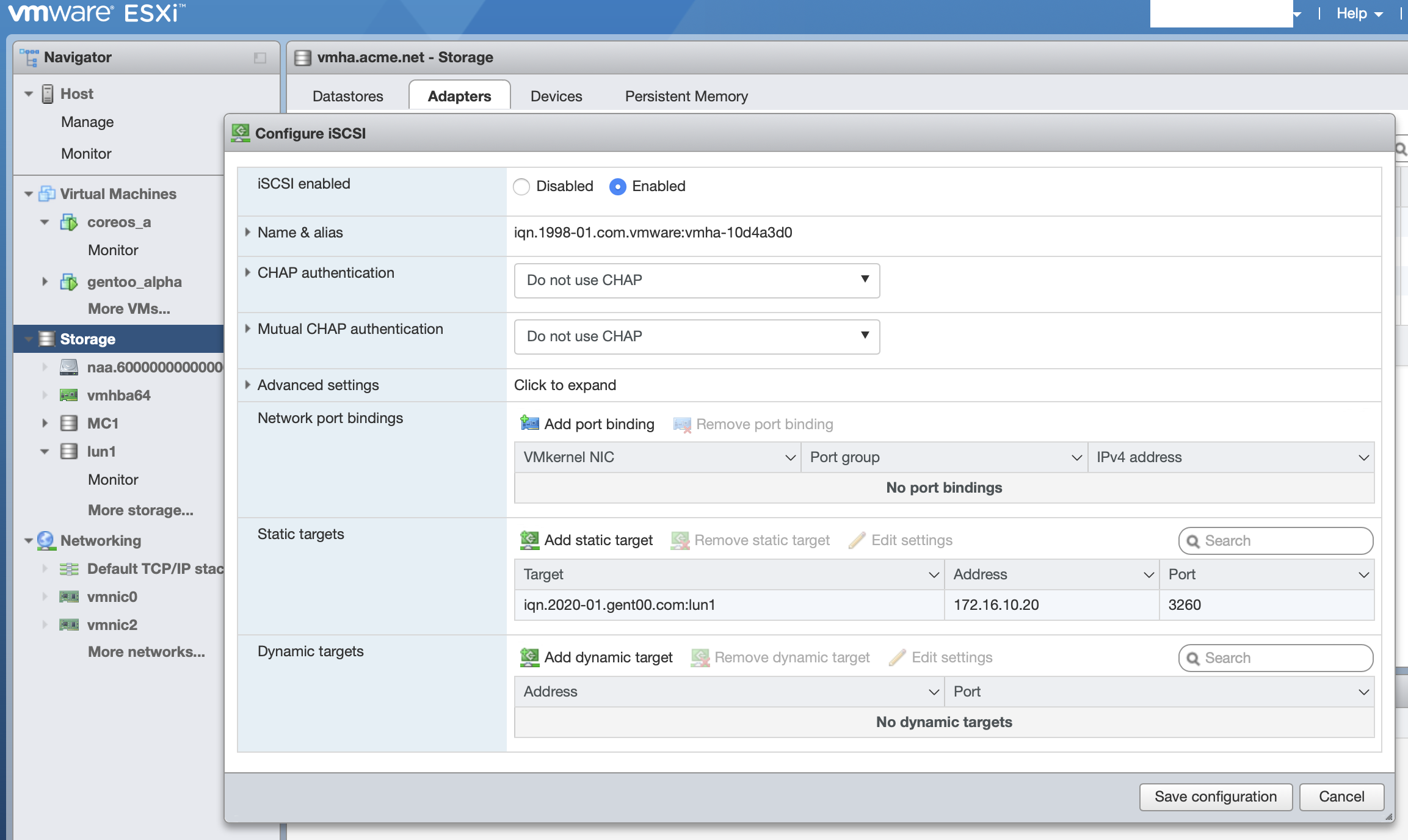 Fill in your target, initiator’s IP, and click
 Save Configuration
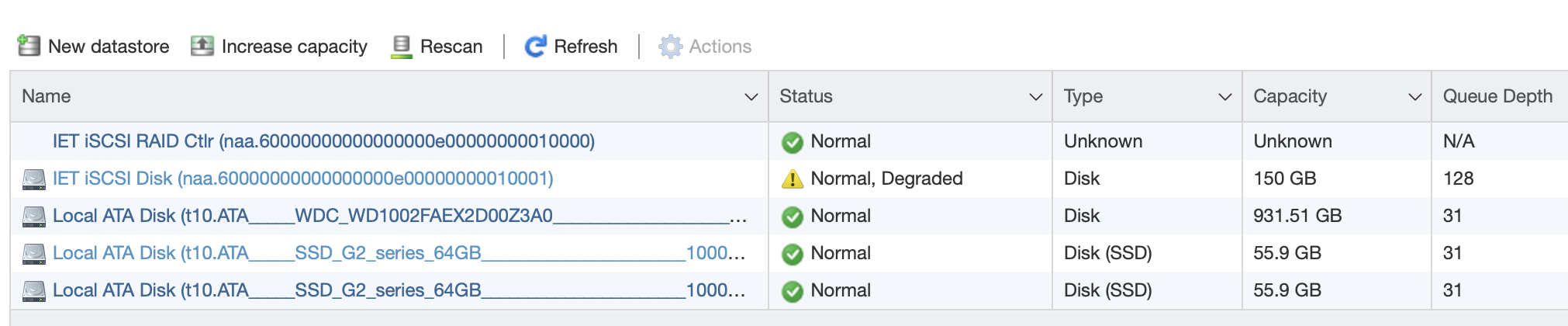
You will want to rescan your HBA your new iSCSI mount should be available to provision for vmfs now